
树莓派(Ubuntu)安装经典版eclipse(web)
Ubuntu终端执行sudo apt-get install eclipse安装基础软件,需通过Help->Install New Software添加http://download.eclipse.org/releases/galileo源,选择Web,XML及Java EE开发插件完成功能扩展。
Ubuntu终端执行sudo apt-get install eclipse安装基础软件,需通过Help->Install New Software添加http://download.eclipse.org/releases/galileo源,选择Web,XML及Java EE开发插件完成功能扩展。
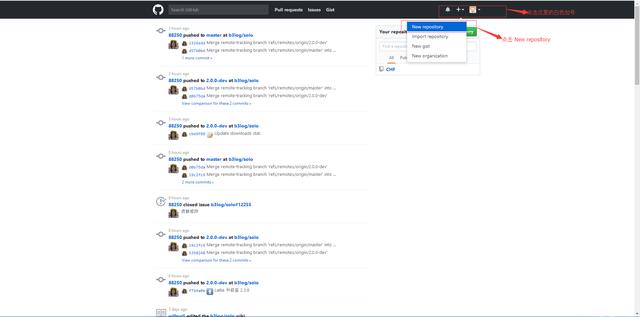
GitHub注册需填写用户名、邮箱和密码,创建项目需填写名称并选择公开或私有,公开项目免费。完成注册和项目创建后,下一步将介绍Eclipse中安装egit插件。

在Linux系统安装OpenCV Java开发环境,需配置JAVA_HOME路径、编译源码并导入Eclipse工程,设置本地库路径为/usr/local/share/OpenCV/java后运行。
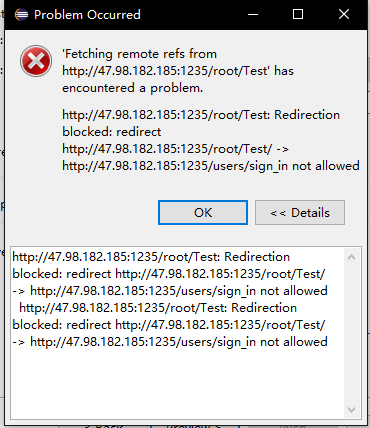
检查代码文件是否提交,确认连接方式为HTTP或SSH,并验证HTTP端口是否正确。

Maven安装需先配置JDK,包括下载jar包、设置环境变量、配置阿里云镜像仓库,并在Eclipse中配置Maven路径和用户设置,最后导入项目。
解决Selenium+eclips报:Unexpected error launching Internet Explorer. IELaunchURL() returned HRESULT 80070002 ('系统找不到指定的文件。')

解决Selenium+eclips报:Exception in thread "main" org.openqa.selenium.SessionNotCreatedException: Unexpected error launching Internet Explorer. Protected Mode settings are not the same for all zones. Enable Protected Mode must be set to the same value (enabled or disabled) for all zones.