AI摘要
Sipeed NanoCluster集群板风扇默认满速噪音大,可通过修改/boot/firmware/config.txt添加PWM overlay,利用Slot 1设备控制转速,并提供手动测试命令与Python自动温控脚本,实现按温度调节风扇。
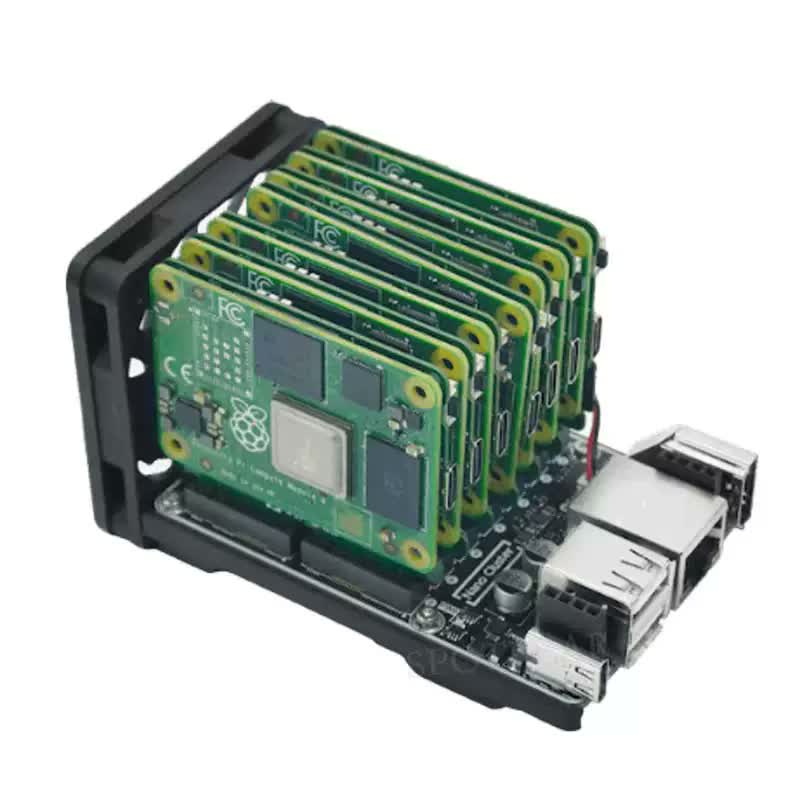
Sipeed NanoCluster迷你集群板 风扇通电后是满速运行,非常的吵,但是可以通过Slot 1设备来控制风扇转速;
我的是CM4主板,下面是具体的操作;
1、修改/boot/firmware/config.txt文件添加 下面的内容
[all]
dtoverlay=pwm-2chan,pin=12,func=4,pin2=13,func2=4
然后重启slot 1的设备
reboot2、测试控制风扇
# 重启后检查 PWM 是否可用
ls /sys/class/pwm/

# 应该能看到 pwmchip0 和 pwmchip2

# 导出 GPIO13(对应 pwmchip0 的通道 1)
echo 1 | sudo tee /sys/class/pwm/pwmchip0/export 2>/dev/null

# 设置周期和占空比
echo 20000000 | sudo tee /sys/class/pwm/pwmchip0/pwm1/period      # 20ms = 50Hz
echo 8000000 | sudo tee /sys/class/pwm/pwmchip0/pwm1/duty_cycle   # 40% 转速
echo 1 | sudo tee /sys/class/pwm/pwmchip0/pwm1/enable             # 启动

# 关风扇
echo 0 | sudo tee /sys/class/pwm/pwmchip0/pwm1/duty_cycle

# 满速
echo 20000000 | sudo tee /sys/class/pwm/pwmchip0/pwm1/duty_cycle
3、自动温控脚本(Python)
文件位置:/usr/local/bin/fan_control.py,脚本名称:fan_control.py
#!/usr/bin/env python3
"""
fan_control.py - 5V 风扇 PWM 调速控制
迟滞 + 最小运行时间,每 3 秒打印温度

- 温度 >= 46°C -> 风扇启动(20% 起步,按温度曲线调速)
- 温度 < 44°C -> 风扇停转(需满足最小运行时间)
- 44~46°C 之间保持当前状态
- 每 3 秒打印温度到 journal
"""

import time
import os

PWM_CHIP = '/sys/class/pwm/pwmchip0'
PWM_PATH = f'{PWM_CHIP}/pwm1'
PERIOD = 20000000

TEMP_CURVE = [(46, 20), (50, 40), (55, 60), (60, 80), (65, 100)]

FAN_ON_TEMP = 46
FAN_OFF_TEMP = 44
MIN_RUN_SECONDS = 600

def setup_pwm():
    if os.path.exists(PWM_PATH):
        try:
            with open(f'{PWM_CHIP}/unexport', 'w') as f:
                f.write('1')
            time.sleep(0.1)
        except Exception as e:
            print(f'unexport warn: {e}')
    try:
        with open(f'{PWM_CHIP}/export', 'w') as f:
            f.write('1')
        time.sleep(0.3)
    except Exception as e:
        print(f'export err: {e}')
        return False
    for _ in range(20):
        if os.path.exists(f'{PWM_PATH}/period'):
            break
        time.sleep(0.1)
    if not os.path.exists(f'{PWM_PATH}/period'):
        print('PWM init failed')
        return False
    try:
        with open(f'{PWM_PATH}/period', 'w') as f:
            f.write(str(PERIOD))
        with open(f'{PWM_PATH}/enable', 'w') as f:
            f.write('1')
        return True
    except Exception as e:
        print(f'PWM cfg err: {e}')
        return False

def get_temp():
    try:
        with open('/sys/class/thermal/thermal_zone0/temp') as f:
            return float(f.read().strip()) / 1000.0
    except:
        return 50

def set_duty(pct):
    try:
        with open(f'{PWM_PATH}/duty_cycle', 'w') as f:
            f.write(str(int(PERIOD * pct / 100)))
    except Exception as e:
        print(f'duty err: {e}')

if not setup_pwm():
    time.sleep(3)
    if not setup_pwm():
        print('FATAL: PWM init failed')
        import sys; sys.exit(1)

fan_on = False
fan_start_time = 0
cur_duty = -1
print('fan-control started 5V PWM on>=46C off<44C min_run=600s')
while True:
    t = get_temp()

    if not fan_on and t >= FAN_ON_TEMP:
        fan_on = True
        fan_start_time = time.time()
        print(f'{t:.1f}C -> Fan ON (started, min run {MIN_RUN_SECONDS}s)')
    elif fan_on and t < FAN_OFF_TEMP:
        elapsed = time.time() - fan_start_time
        if elapsed >= MIN_RUN_SECONDS:
            fan_on = False
            print(f'{t:.1f}C -> Fan OFF (ran {elapsed:.0f}s)')

    if fan_on:
        d = 20
        for tt, dd in TEMP_CURVE:
            if t >= tt:
                d = dd
    else:
        d = 0

    if d != cur_duty:
        set_duty(d)
        cur_duty = d
        print(f'{t:.1f}C -> Fan {d}% [{"ON" if fan_on else "OFF"}]')

    state = 'ON' if fan_on else 'OFF'
    elapsed = time.time() - fan_start_time if fan_on else 0
    print(f'{t:.1f}C Fan={state}' + (f' run={elapsed:.0f}s' if fan_on else ''))
    time.sleep(3)
4、日志查看
输入命令行下面的命令行, 可以实时查看CM4温度
journalctl -u fan-control.service -f日志:
Aug 01 12:10:47 Saiita systemd[1]: Stopped fan-control.service - NanoCluster Fan Control.
Aug 01 12:10:47 Saiita systemd[1]: Starting fan-control.service - NanoCluster Fan Control...
Aug 01 12:10:47 Saiita systemd[1]: Started fan-control.service - NanoCluster Fan Control.
Aug 01 12:10:47 Saiita python3[54971]: fan-control started hysteresis on>=46C off<44C min_run=600s
Aug 01 12:10:47 Saiita python3[54971]: 47.2C -> Fan ON (started, min run 600s)
Aug 01 12:10:47 Saiita python3[54971]: 47.2C -> Fan 20% [ON]
Aug 01 12:20:48 Saiita python3[54971]: 39.4C -> Fan OFF (ran 600s)
Aug 01 12:20:48 Saiita python3[54971]: 39.4C -> Fan 0% [OFF]
Aug 01 12:22:08 Saiita python3[54971]: 46.3C -> Fan ON (started, min run 600s)
Aug 01 12:22:08 Saiita python3[54971]: 46.3C -> Fan 20% [ON]
5、设置开机自启动
sudo nano /etc/systemd/system/fan-control.service
写入
[Unit]
Description=NanoCluster Fan Control
After=multi-user.target

[Service]
Type=simple
ExecStart=/usr/bin/python3 /usr/local/bin/fan_control.py
Restart=always
RestartSec=10

[Install]
WantedBy=multi-user.target
然后启用:
sudo systemctl daemon-reload
sudo systemctl enable --now fan-control.service
sudo systemctl status fan-control.service


暂无评论
要发表评论,您必须先 登录