AI摘要
Open-WebUI通过pipelines管道支持图片理解和视频识别,但本身不支持视频上传。配置pipelines后,可集成Ollama本地图片模型(如gemma3:27b)和智普免费图片模型(如glm-4.1v-thinking-flash)。代码优先使用智普模型(若配置),仅Ollama的qwen3-vl:8b支持视频处理,智普模型仅支持图片。
open-webui 支持图片理解
通过pipelines管道让open-webui 支持对话流程中多次图片和视频识别内容;但是open-webui 不支持视频上传,所以视频理解功能受限;open-webui 上传视频会报错,报错信息:File type video/mp4 is not supported for processing
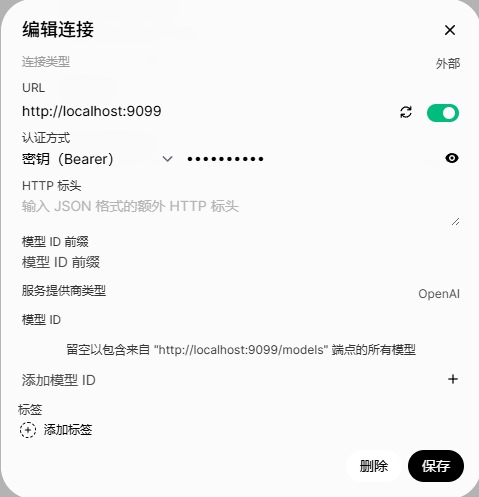
只要先部署好pipelines和open-webui 配置pipelines,上传下面的python 文件,就可以实现open-webui 识别图片功能;


具体实现代码是pipelines官方文件(dynamic_ollama_vision_filter_pipeline.py)改的,支持ollama 本地图片模型(gemma3:27b)和智普免费图片模型(glm-4.1v-thinking-flash),
代码工作流程
- 如果只配置ollama ,没添加智普URL和API KEY,则优先使用ollama;
- 同时配置了ollama 和 智普时,优先智普模型(因为免费)
pipelines完整的代码
"""
title: Dynamic Vision Pipeline (Ollama + ZhipuAI)
author: Andrew Tait Gehrhardt (modified for GLM-4.1V-Thinking-Flash support)
date: 2024-06-18
version: 2.1
license: MIT
description: A pipeline for dynamically processing images and videos when current model is a text only model.
Supports both Ollama and ZhipuAI models with intelligent routing.
Note: Only Ollama qwen3-vl:8b supports video processing; ZhipuAI models support images only.
requirements: pydantic, aiohttp
"""
from typing import List, Optional
from pydantic import BaseModel
import json
import aiohttp
import base64
import os
from utils.pipelines.main import get_last_user_message
class Pipeline:
class Valves(BaseModel):
pipelines: List[str] = []
priority: int = 0
# Ollama configuration
ollama_vision_model: str = "gemma3:27b"
ollama_base_url: str = "http://localhost:11434"
# ZhipuAI configuration
zhipuai_enabled: bool = False
zhipuai_api_key: str = ""
zhipuai_base_url: str = "https://open.bigmodel.cn"
# ZhipuAI models
zhipuai_image_model: str = "glm-4.1v-thinking-flash" # Primary image model (images only)
zhipuai_video_model: str = "glm-4.5v" # Video + image model (supports both)
# Ollama models
ollama_image_model: str = "gemma3:27b" # For images only
ollama_video_model: str = "qwen3-vl:8b" # For images + videos
# Priority configuration: "zhipuai_first" or "ollama_first"
priority_order: str = "zhipuai_first"
# Legacy support
model_to_override: str = "deepseek"
def __init__(self):
self.type = "filter"
self.name = "Dynamic Vision Filter (Ollama + ZhipuAI)"
self.valves = self.Valves(
**{
"pipelines": ["*"], # Connect to all pipelines
# Ollama configuration from environment
"ollama_base_url": os.getenv("OLLAMA_BASE_URL", "http://localhost:11434"),
"ollama_image_model": os.getenv("OLLAMA_IMAGE_MODEL", "gemma3:27b"),
"ollama_video_model": os.getenv("OLLAMA_VIDEO_MODEL", "qwen3-vl:8b"),
# ZhipuAI configuration from environment
"zhipuai_enabled": os.getenv("ZHIPUAI_ENABLED", "false").lower() == "true",
"zhipuai_api_key": os.getenv("ZHIPUAI_API_KEY", ""),
"zhipuai_base_url": os.getenv("ZHIPUAI_BASE_URL", "https://open.bigmodel.cn"),
"zhipuai_image_model": os.getenv("ZHIPUAI_IMAGE_MODEL", "glm-4.1v-thinking-flash"),
"zhipuai_video_model": os.getenv("ZHIPUAI_VIDEO_MODEL", "glm-4.5v"),
# Priority configuration
"priority_order": os.getenv("VISION_PRIORITY_ORDER", "zhipuai_first"),
# Legacy support
"model_to_override": os.getenv("MODEL_TO_OVERRIDE", "deepseek"),
}
)
async def on_startup(self):
print(f"on_startup:{__name__}")
print("Dynamic Vision Filter starting...")
print(f"ZhipuAI Enabled: {self.valves.zhipuai_enabled}")
if self.valves.zhipuai_enabled:
print(f" - 图片模型: {self.valves.zhipuai_image_model}")
print(f" - 视频模型: {self.valves.zhipuai_video_model}")
print(f" - API Key configured: {'Yes' if self.valves.zhipuai_api_key else 'No'}")
print(f" - Base URL: {self.valves.zhipuai_base_url}")
print(f"Ollama Configuration:")
print(f" - 图片模型: {self.valves.ollama_image_model}")
print(f" - 视频模型: {self.valves.ollama_video_model}")
print(f" - Base URL: {self.valves.ollama_base_url}")
print(f"Priority Order: {self.valves.priority_order}")
print(f"Override Models: {self.valves.model_to_override}")
pass
async def on_shutdown(self):
print(f"on_shutdown:{__name__}")
pass
async def process_media_with_zhipuai(self, images: List[str], videos: List[str], content: str, api_key: str, base_url: str, model: str) -> str:
"""使用智谱AI GLM-4.1V-Thinking-Flash处理图片和视频"""
url = f"{base_url}/api/paas/v4/chat/completions"
# 构建消息内容
message_content = []
# 添加文本内容
if content:
message_content.append({
"type": "text",
"text": content
})
else:
# 根据是否有视频调整提示词
if videos:
message_content.append({
"type": "text",
"text": "请描述这段视频的内容,包括其中发生的事件、人物、物体等关键信息"
})
else:
message_content.append({
"type": "text",
"text": "请描述这张图片的内容"
})
# 添加图片内容
for img_data in images:
# 检测是否已经是完整的数据URL格式
if img_data.startswith('data:image/'):
image_url = img_data
else:
# 假设是纯base64数据,需要添加前缀
image_url = f"data:image/jpeg;base64,{img_data}"
message_content.append({
"type": "image_url",
"image_url": {
"url": image_url
}
})
# 添加视频内容
for video_data in videos:
# 智谱AI GLM-4.5v 需要公开可访问的视频URL,不支持base64编码
if video_data.startswith(('http://', 'https://')):
# 如果是URL,直接使用
video_url = video_data
print(f"使用公开视频URL: {video_url}")
elif video_data.startswith('data:video/'):
# 如果是base64数据,发出警告但仍尝试使用
print("⚠️ 警告:智谱AI GLM-4.5v 建议使用公开URL而非base64编码的视频数据")
video_url = video_data
else:
# 假设是纯base64数据
print("⚠️ 警告:智谱AI GLM-4.5v 建议使用公开URL而非base64编码的视频数据")
video_url = f"data:video/mp4;base64,{video_data}"
message_content.append({
"type": "video_url",
"video_url": {
"url": video_url
}
})
payload = {
"model": model,
"messages": [
{
"role": "user",
"content": message_content
}
],
"stream": False,
"temperature": 0.3,
"max_tokens": 1000
}
# 添加thinking参数(用于GLM-4.5v视频处理)
if "4.5" in model and videos:
payload["thinking"] = {
"type": "enabled"
}
headers = {
"Authorization": f"Bearer {api_key}",
"Content-Type": "application/json"
}
print(f"Calling ZhipuAI API: {url}")
print(f"Model: {model}")
print(f"Content: {content}")
print(f"Images count: {len(images)}")
print(f"Videos count: {len(videos)}")
try:
async with aiohttp.ClientSession() as session:
async with session.post(url, json=payload, headers=headers) as response:
print(f"ZhipuAI response status: {response.status}")
if response.status == 200:
response_data = await response.json()
result = response_data.get("choices", [{}])[0].get("message", {}).get("content", "")
print(f"ZhipuAI response: {result[:100]}..." if len(result) > 100 else f"ZhipuAI response: {result}")
return result
else:
error_text = await response.text()
print(f"Failed to process images with ZhipuAI, status code: {response.status}")
print(f"Error response: {error_text}")
return f"Error: Failed to process image with ZhipuAI (status {response.status})"
except Exception as e:
print(f"Exception when calling ZhipuAI: {str(e)}")
return f"Error: {str(e)}"
async def process_images_with_zhipuai(self, images: List[str], content: str, api_key: str, base_url: str, model: str) -> str:
"""向后兼容的图片处理方法"""
return await self.process_media_with_zhipuai(images, [], content, api_key, base_url, model)
async def process_media_with_ollama(self, images: List[str], videos: List[str], content: str, vision_model: str, ollama_base_url: str) -> str:
"""使用Ollama处理图片(注:Ollama目前不支持视频处理)"""
# 如果有视频,返回提示信息
if videos:
print("Warning: Ollama does not support video processing. Videos will be ignored.")
url = f"{ollama_base_url}/api/chat"
payload = {
"model": vision_model,
"messages": [
{
"role": "user",
"content": content,
"images": images
}
],
"stream": False # 不使用流式响应
}
print(f"Calling Ollama API: {url}")
print(f"Model: {vision_model}")
print(f"Content: {content}")
print(f"Images count: {len(images)}")
if videos:
print(f"Videos count: {len(videos)} (ignored - Ollama doesn't support video)")
try:
async with aiohttp.ClientSession() as session:
async with session.post(url, json=payload) as response:
print(f"Ollama response status: {response.status}")
if response.status == 200:
response_text = await response.text()
print(f"Response preview: {response_text[:200]}...")
# 尝试直接解析JSON(非流式响应)
try:
response_data = json.loads(response_text)
result = response_data.get("message", {}).get("content", "")
print(f"Ollama response (JSON): {result[:100]}..." if len(result) > 100 else f"Ollama response (JSON): {result}")
return result
except json.JSONDecodeError:
# 如果直接解析失败,处理SSE格式
print("Detected SSE format, parsing...")
content_parts = []
lines = response_text.strip().split('\n')
for line in lines:
line = line.strip()
if line.startswith('data: '):
json_str = line[6:] # 移除 'data: '
if json_str and json_str != '[DONE]':
try:
data = json.loads(json_str)
content = data.get("message", {}).get("content", "")
content_parts.append(content)
except json.JSONDecodeError as e:
print(f"JSON解析错误: {e}, 原始数据: {json_str}")
continue
result = "".join(content_parts)
print(f"Ollama response (SSE): {result[:100]}..." if len(result) > 100 else f"Ollama response (SSE): {result}")
return result
else:
error_text = await response.text()
print(f"Failed to process images with Ollama, status code: {response.status}")
print(f"Error response: {error_text}")
return f"Error: Failed to process image with Ollama (status {response.status})"
except Exception as e:
print(f"Exception when calling Ollama: {str(e)}")
return f"Error: {str(e)}"
async def process_images_with_ollama(self, images: List[str], content: str, vision_model: str, ollama_base_url: str) -> str:
"""向后兼容的Ollama图片处理方法"""
return await self.process_media_with_ollama(images, [], content, vision_model, ollama_base_url)
async def process_images_with_priority_routing(self, images: List[str], content: str) -> str:
"""智能路由:优先使用智谱AI,如果配置错误或失败则回退到Ollama"""
zhipuai_available = (
self.valves.zhipuai_enabled and
self.valves.zhipuai_api_key and
self.valves.zhipuai_base_url
)
ollama_available = (
self.valves.ollama_base_url and
self.valves.ollama_vision_model
)
print(f"ZhipuAI available: {zhipuai_available}")
print(f"Ollama available: {ollama_available}")
print(f"Priority order: {self.valves.priority_order}")
if self.valves.priority_order == "zhipuai_first":
# 优先使用智谱AI
if zhipuai_available:
print("Trying ZhipuAI first...")
result = await self.process_images_with_zhipuai(
images, content,
self.valves.zhipuai_api_key,
self.valves.zhipuai_base_url,
self.valves.glm_model
)
if not result.startswith("Error:"):
return result
print("ZhipuAI failed, falling back to Ollama...")
elif ollama_available:
print("ZhipuAI not configured, using Ollama...")
return await self.process_images_with_ollama(
images, content,
self.valves.ollama_vision_model,
self.valves.ollama_base_url
)
else:
return "Error: No vision model configured. Please configure either ZhipuAI or Ollama."
elif self.valves.priority_order == "ollama_first":
# 优先使用Ollama
if ollama_available:
print("Trying Ollama first...")
result = await self.process_images_with_ollama(
images, content,
self.valves.ollama_vision_model,
self.valves.ollama_base_url
)
if not result.startswith("Error:"):
return result
print("Ollama failed, falling back to ZhipuAI...")
elif zhipuai_available:
print("Ollama not configured, using ZhipuAI...")
return await self.process_images_with_zhipuai(
images, content,
self.valves.zhipuai_api_key,
self.valves.zhipuai_base_url,
self.valves.glm_model
)
else:
return "Error: No vision model configured. Please configure either Ollama or ZhipuAI."
else:
return f"Error: Invalid priority_order '{self.valves.priority_order}'. Use 'zhipuai_first' or 'ollama_first'."
async def process_media_with_priority_routing(self, images: List[str], videos: List[str], content: str) -> str:
"""使用优先级路由处理媒体"""
has_videos = len(videos) > 0
# 按优先级尝试不同的模型组合
routing_strategies = []
if has_videos:
# 有视频时的优先级策略
print("检测到视频内容,优先尝试支持视频的模型")
if self.valves.zhipuai_enabled:
routing_strategies.append({
"name": "智谱AI视频模型 (GLM-4.5v)",
"provider": "zhipuai",
"model": self.valves.zhipuai_video_model, # glm-4.5v
"supports_video": True
})
routing_strategies.append({
"name": "Ollama视频模型 (qwen3-vl:8b)",
"provider": "ollama",
"model": self.valves.ollama_video_model, # qwen3-vl:8b
"supports_video": True
})
else:
# 只有图片时的优先级策略
print("检测到图片内容,按优先级尝试图片处理模型")
if self.valves.zhipuai_enabled:
routing_strategies.append({
"name": "智谱AI主图片模型 (GLM-4.1V-Thinking-Flash)",
"provider": "zhipuai",
"model": self.valves.zhipuai_image_model, # glm-4.1v-thinking-flash
"supports_video": False
})
routing_strategies.append({
"name": "Ollama图片模型 (gemma3:27b)",
"provider": "ollama",
"model": self.valves.ollama_image_model, # gemma3:27b
"supports_video": False
})
# 尝试每个策略
last_error = None
for strategy in routing_strategies:
try:
print(f"尝试使用 {strategy['name']}: {strategy['model']}")
if strategy["provider"] == "zhipuai":
result = await self.process_media_with_zhipuai(
images, videos, content, # 智谱AI支持视频(GLM-4.5v)
self.valves.zhipuai_api_key,
self.valves.zhipuai_base_url,
strategy["model"]
)
print(f"✅ {strategy['name']} 处理成功")
return result
else: # ollama
result = await self.process_media_with_ollama(
images, videos, content, # Ollama也支持视频(qwen3-vl:8b)
strategy["model"],
self.valves.ollama_base_url
)
print(f"✅ {strategy['name']} 处理成功")
return result
except Exception as e:
last_error = e
print(f"❌ {strategy['name']} 处理失败: {e}")
continue
# 所有策略都失败
if has_videos:
error_msg = f"所有视频处理策略都失败了。最后错误: {last_error}"
else:
error_msg = f"所有图片处理策略都失败了。最后错误: {last_error}"
print(error_msg)
raise Exception(error_msg)
async def inlet(self, body: dict, user: Optional[dict] = None) -> dict:
print(f"pipe:{__name__}")
images = []
videos = []
# Ensure the body is a dictionary
if isinstance(body, str):
body = json.loads(body)
model = body.get("model", "")
print(f"Current model: {model}")
# Get the content of the most recent message
user_message = get_last_user_message(body["messages"])
# Check if current model is in the override list (supports comma-separated values and fuzzy matching)
override_models = [m.strip() for m in self.valves.model_to_override.split(",") if m.strip()]
print(f"Override models: {override_models}")
# 模糊匹配函数
def is_model_match(current_model: str, override_model: str) -> bool:
# 精确匹配
if current_model == override_model:
return True
# 包含匹配
if override_model in current_model or current_model in override_model:
return True
# 忽略大小写匹配
if override_model.lower() in current_model.lower() or current_model.lower() in override_model.lower():
return True
# 去除特殊字符后匹配
import re
current_clean = re.sub(r'[^a-zA-Z0-9\u4e00-\u9fff]', '', current_model).lower()
override_clean = re.sub(r'[^a-zA-Z0-9\u4e00-\u9fff]', '', override_model).lower()
if override_clean in current_clean or current_clean in override_clean:
return True
return False
# 检查是否有匹配的模型
model_matched = any(is_model_match(model, override_model) for override_model in override_models)
print(f"Model in override list (fuzzy match): {model_matched}")
if model_matched:
matched_models = [override_model for override_model in override_models if is_model_match(model, override_model)]
print(f"Matched with: {matched_models}")
if model_matched:
messages = body.get("messages", [])
for message in messages:
# 检查传统格式的 images 字段
if "images" in message:
print(f"Found images field in message: {len(message['images'])} images")
images.extend(message["images"])
# 检查 content 数组中的图片和视频
if "content" in message and isinstance(message["content"], list):
print(f"Checking content array for images and videos...")
content_images = []
content_videos = []
content_text = ""
for item in message["content"]:
if item.get("type") == "text":
content_text += item.get("text", "")
elif item.get("type") == "image_url":
image_url = item.get("image_url", {}).get("url", "")
if image_url.startswith("data:image/"):
# 提取 base64 图片数据
base64_data = image_url.split(",", 1)[1] # 移除 data:image/png;base64, 前缀
content_images.append(base64_data)
print(f"Found base64 image in content, length: {len(base64_data)}")
elif item.get("type") == "video_url":
video_url = item.get("video_url", {}).get("url", "")
if video_url.startswith("data:video/"):
# 提取 base64 视频数据
base64_data = video_url.split(",", 1)[1] # 移除 data:video/mp4;base64, 前缀
content_videos.append(base64_data)
print(f"Found base64 video in content, length: {len(base64_data)}")
if content_images or content_videos:
print(f"Processing {len(content_images)} images and {len(content_videos)} videos from content array...")
raw_vision_response = await self.process_media_with_priority_routing(content_images, content_videos, content_text or "Describe this media")
# 替换整个 content 为视觉模型的响应
message["content"] = f"REPEAT THIS BACK: {raw_vision_response}"
print(f"Replaced content with vision model response")
else:
messages = body.get("messages", [])
print(f"Total messages: {len(messages)}")
for i, msg in enumerate(messages):
print(f"Message {i}: role={msg.get('role')}, has_images={'images' in msg}, has_videos={'videos' in msg}")
# 也检查其他可能包含媒体文件的字段
for key in ['image', 'file', 'files', 'attachment', 'attachments', 'video', 'videos']:
if key in msg:
print(f" - Also has {key}: True")
return body






暂无评论
要发表评论,您必须先 登录